Loan and CLA platforms
They manage the loan and the budget and decide the draw. Inspection coordination is a feature inside them, so the vendor record is either a closed network they own or a name typed into a field.
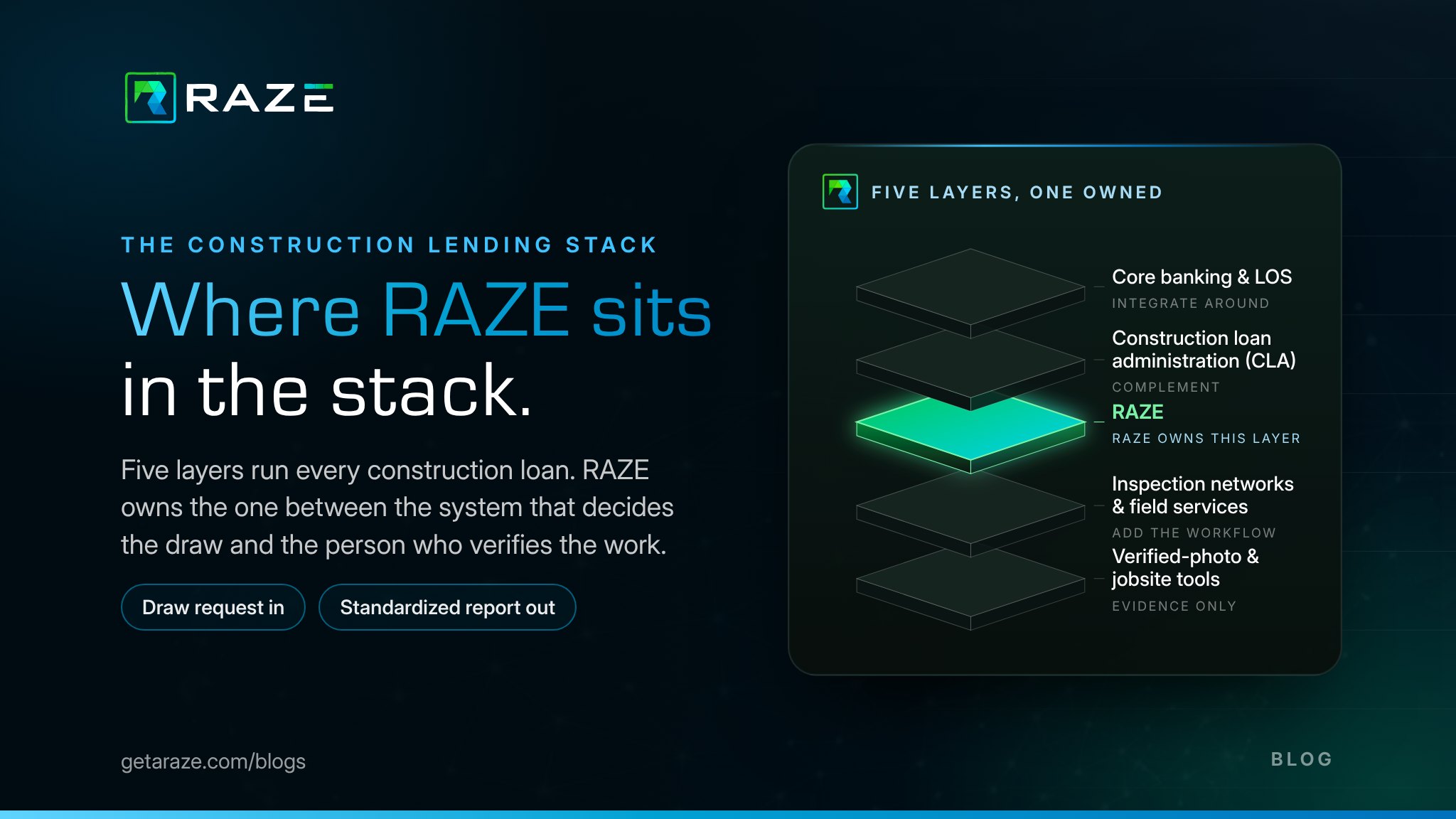
Ask ten people what RAZE is and you will hear "an inspection company," "a construction loan platform," and "some kind of marketplace." The stack below answers it in one picture. RAZE is the field infrastructure of construction lending: it takes project data from the lender's administration platform, moves it to a screened vendor on site at any U.S. address, and brings the verified metadata back to the workflow that asked for it. The three layers below the administration platform run as one.
Select a layer, open every layer at once, or press play to follow one draw request from the lender's desk to the jobsite and back. "Without RAZE" takes the three field layers off their rails to show what most stacks run by phone, email and PDF.
Ordering Engine, Inspector Portal, Marketplace, Direct Request, the RAZE API and RAZE MCP
RAZE screens and pays the vendors, routes every order to one of them at any U.S. address and keeps the record of who did what, when and where.
This is where the field half of the stack begins. Every order, whoever performs it, runs through the same rails and comes back the same way.
Inspections submitted through the RAZE app
Applied vendors
Draw inspection coverage
As of October 2026.
A draw does not fund without a verified site visit
Every draw on every construction loan needs someone on site and proof of what they saw. The lender's platform decides the draw; RAZE moves the request to the vendor and the evidence back.
The vendor side is the hardest data to keep
Who was on site, whether they were screened and insured, where and when each photo was taken, who changed a status and whether the inspector was paid. RAZE holds it as one record per order.
A network only moves if it is screened and paid
Screening and proof of insurance come before a vendor's first order, and RAZE pays its inspector network every Friday. That is what keeps vendors moving around the country, draw after draw.
The platform above keeps its own workflow
Project data goes down through a partner platform, the RAZE API or RAZE MCP, and the verified metadata comes back mapped to the draw. Nothing is re-keyed and nothing a lender runs today is replaced.
The two layers at the top of the stack hold the money and the budget. The three below them hold the vendor, the visit and the evidence, and most stacks run them by phone, email and PDF. The vendor side of a draw inspection is the hardest data to capture, store, validate, report and examine: who was on site, whether they were screened and insured, where and when each photo was taken, who changed a status and why, and whether the inspector was paid.
Tap a stage, or let it play. Each one shows the data, how most stacks handle it today and how RAZE handles it.
Stage 1 of 5 · Capture
Most stacks today
Photos arrive by email or a shared drive, the inspector’s name sits in a PDF header, and the location and time are whatever the camera says.
With RAZE
The Mobile App stamps every capture with GPS, date and time, device type and ID and the photo tags it generates, keeps capturing offline, and files it all to the order.
They manage the loan and the budget and decide the draw. Inspection coordination is a feature inside them, so the vendor record is either a closed network they own or a name typed into a field.
They were built for procurement and cyber risk: questionnaires, certificates and scores. None of them dispatches a site visit or stamps a photo with where and when it was taken.
They own the people or the pixels. A network alone keeps its vendor data inside its own firm, and a photo tool alone proves an image without tying it to an order, a reviewer or a payment.
RAZE runs the three field layers as one workflow and holds the result as one record per order, readable in the Ordering Engine, through the RAZE API or through RAZE MCP, with the lender's own inspectors or its Marketplace.
See how the two fulfillment models compare →The request flows forward and the evidence flows back. Toggle the ordering path to see what changes when a lender has no partner platform in the middle.
How does the lender place the order?
Orders where they already work
CLA platform, aggregator or service group
Vendor management, dispatch and capture
Marketplace coverage or the lender’s own inspector
Four ways an order reaches RAZE
Ordering Engine
Order in the RAZE web app
Partner platform
Order inside a CLA platform
RAZE API
Order from your own system
RAZE MCP
Order from your AI assistant
Two ways it gets fulfilled
Marketplace
RAZE sends the inspector
Direct Request
Your inspector, same workflow
The order format, the capture and the report are the same whoever performs the visit.
One standardized report, geo- and time-stamped photos, percent complete by line item, status events and the full audit trail, delivered back to the system that placed the order.
REST API with a downloadable OpenAPI 3.0.3 reference
Your institution's service account exchanges its credentials for a bearer token, and request examples ship in Shell, Ruby, Node.js, PHP and Python. If your system can make an authenticated HTTPS request, it can work with RAZE.
The same API as an MCP server
MCP-compatible AI assistants order inspections, check status, pull reports and review the capture metadata behind every photo with your own account.
Access and alerts shaped to your institution
Access is customizable inside your institution, custom email notifications and alerts can be part of the integration, and required photos and completion criteria are configured per workflow.
Your inspectors or ours, one record
Direct Request routes an order to the inspector you already use. Marketplace sends a background-checked inspector where you have none. Both return the same report and the same vendor record.
The Developer Portal and the integration team are covered in Bring Your Own Stack, and the MCP in Bring Your Own AI. One live CLA integration is described in CLA integration for residential draw inspections.
One report format and one vendor record on every draw, regardless of who performed the visit, without replacing anything you run today.
Request a Demo →One integration surface that works whether the order starts in a CLA platform, a proprietary system or an AI agent, with the sandbox and reference you expect.
See how Bring Your Own Stack works →Infrastructure, not a feature. Every draw on every construction loan needs a vendor on site and verified evidence back, and RAZE is the rails that move project data down and verified metadata up, with a network that keeps moving because it is screened and paid every Friday.
Read why lenders and inspectors choose RAZE →Why lenders and inspectors choose RAZE
What the inspection layer looks like from both sides of the workflow.
Marketplace vs. Direct Request
The two ways an order gets fulfilled, and when to use each.
Bring your own stack
Order and file draw inspections from the system you already run.
CLA integration for residential draws
A live example of RAZE complementing the CLA layer.
Best construction draw inspection software
The named platforms in each layer of the stack.
Order inside the platform you already use or connect your own system. The workflow, the report and the vendor record are the same either way.
See how a draw request becomes a standardized inspection report without replacing your CLA platform or your inspectors.
Request a DemoConnect a CLA platform, a lender system or an AI assistant to the RAZE workflow. Tell us what you are building and we will set up access.
Talk to SalesStandardize your draw inspections with RAZE
Request a Demo