RAZE Developer Portal

The Draw Inspection API for the Loan System You Already Run

Order draw inspections from your own loan system and pull status, reports, photos, and documents back through the RAZE API. Step-by-step guides, an API reference, and our integration team help you connect.

  • Order and track inspections by API
  • Pull reports, photos, and documents
  • Access controlled by your institution
  • Custom email notifications and alerts
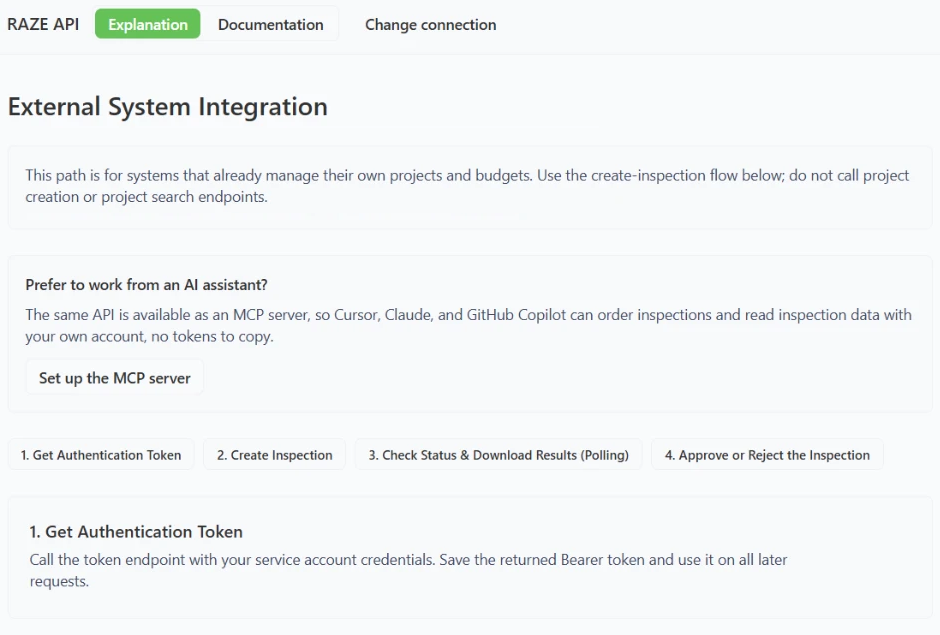
External System Integration guide in the RAZE Developer Portal, with four steps: get an authentication token, create the inspection, check status and download results, and approve or reject the inspection
The External System guide, for loan systems that keep their own projects and budgets.

Trusted by lenders nationwide

  • $1B+

    in monitored assets

  • 51,000+

    inspections submitted through the RAZE app

  • 48

    states with draw inspection coverage

  • 3,000+

    inspector and vendor applications

Two ways to connect

Pick the path that fits your loan system

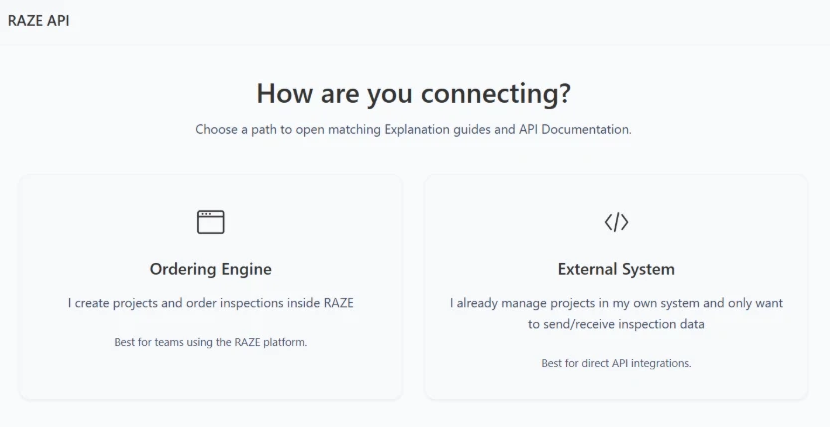
The Developer Portal starts by asking how you connect, then opens the guides and API reference for that path.

RAZE Developer Portal start screen asking how you are connecting, with two paths: Ordering Engine and External System
The first screen your developers see in the Developer Portal.

External System

For proprietary and in-house loan systems

Your projects and budgets stay in your system. Each inspection order carries the project details, and RAZE sends back status, reports, photos, and documents.

  • No project setup or sync in RAZE
  • Order, track, approve, or reject by API
Ordering Engine

For teams that work in RAZE

Create projects and order inspections in RAZE, by API or in the Ordering Engine, and track every order in one place.

  • Projects, budgets, and documents in RAZE
  • Every order visible to your team
Explore the Ordering Engine

Using Presidium by CodeFi? RAZE already integrates with it.

How the Presidium integration works

How the API works

From first token to final decision

The External System guide walks your developers through four steps, and the API reference shows each request in Shell, Ruby, Node.js, PHP, and Python.

  1. 1

    Authenticate

    Auth

    Exchange your institution's service account credentials for a bearer token, then send it with every request.

  2. 2

    Create the inspection

    Create Inspection

    Send the order with your project details, then upload project documents such as the budget and plans, as multipart files or Base64 JSON.

  3. 3

    Check status and download results

    Check Status

    Poll the inspection's status and download the report, photos, and documents when it is complete.

  4. 4

    Approve or reject

    Approve / Reject

    Record your decision on the finished inspection without leaving your own system.

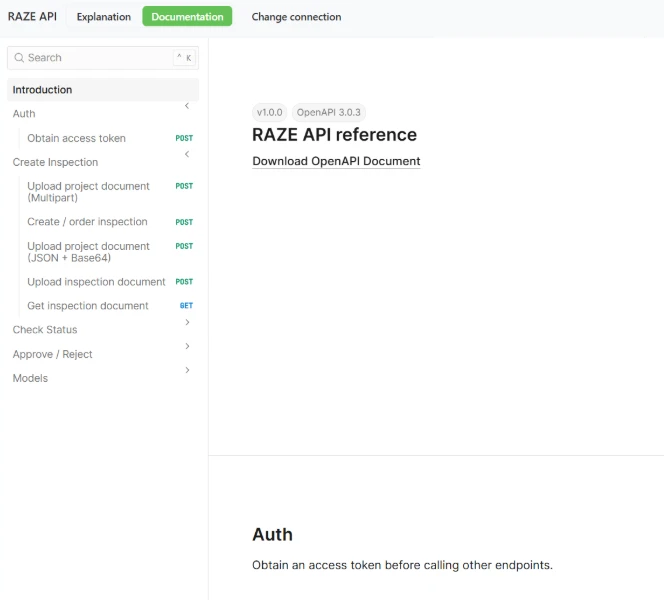
RAZE API reference in the Developer Portal, version 1.0.0 on OpenAPI 3.0.3, with endpoints grouped under Auth, Create Inspection, Check Status, and Approve / Reject
The API reference groups its endpoints by the same four steps, with a downloadable OpenAPI 3.0.3 document.

Integration support

Documentation, access control, and a team to help you connect

01

Guides and API reference

Step-by-step guides for each connection path, plus an OpenAPI 3.0.3 reference your developers can download into their own tools.

02

Our integration team

RAZE works with your developers or IT partner to connect your loan system, and answers questions along the way.

03

Access set by your institution

Access is customizable inside your institution, so you decide who connects through the API or the MCP server.

04

Custom email notifications and alerts

We can build custom email notifications and alerts into your integration for the people and events your team cares about.

RAZE MCP

The same API, from your AI assistant

The RAZE MCP server gives MCP-compatible AI assistants and agents the same operations as the RAZE API. Each person signs in with their own RAZE account, so there are no tokens to copy.

  • Order inspections and create projects
  • Check inspection status and history
  • Pull reports, photos, and questionnaire answers
  • Review capture metadata: GPS location, date and time stamps
  • You sign in as you. The AI can only do what your RAZE permissions allow, and every action is logged to your user.
  • Writes wait for a yes. Ordering, accepting, rejecting, submitting, and cancelling show you a summary first. Nothing happens until you confirm.
  • Reads are instant. Searching, comparing, and reporting need no confirmation because they change nothing.

Example

Which inspections are open this week, and which ones don't have an inspector yet?

Here are this week's open inspections. 412 Bayshore and 18 Maple Street still need an inspector. Want me to find nearby inspectors for both?

Who it's for

Built for lenders that run their own systems

Private lenders

Keep your loan system and add standardized draw inspections to it.

  • Order from the system you already use
  • RAZE Marketplace inspectors or your own
  • One report format for every inspector
Construction draw inspections for lenders

Banks and credit unions

Add draw inspections beside your CLA, LOS, and core. RAZE replaces none of them.

  • No core or LOS change
  • Presidium by CodeFi already integrated
  • An audit-ready record behind every draw
Draw inspection compliance FAQs

Developers and IT partners

What your developers need to build, test, and support the connection.

  • Guides for each connection path
  • Request examples in Shell, Node.js, Python, and more
  • Test requests from the API reference

Pricing

No platform fee. Pay per inspection.

API and MCP access come with RAZE. No minimums. Billed monthly.

Marketplace

$125

per inspection, single-family

RAZE sends a background-checked inspector and reviews the report.

Direct Request

$25

per request

You send your own inspector through the same workflow and report.

  • +$35 per additional unit, duplex through quadplex
  • Order from the Ordering Engine, by API, or by MCP
  • Mobile App for your inspectors
  • No change to your core or LOS

Rates are for residential draw inspections and are subject to a RAZE master services agreement. Some programs include a one-time implementation fee, quoted before you sign. Contact us for commercial and portfolio pricing.

Common questions

Developer Portal and API questions

Keep reading

More on connecting RAZE to your workflow

Ready to start

Connect your loan system to RAZE

Tell us what you run today, and our integration team will walk you through the right path.