Multi-Budget Draw Inspection Reports

Plenty of construction loans fund more than one budget. A custom home with a pool on its own schedule. A main contract beside the site work and a contingency. A builder's cost to construct next to the owner's allowances. The lender funds each on its own terms, and at every draw someone has to show what each one bought.
A single draw sheet that sums every budget into one set of totals hides that split. The RAZE residential draw inspection report keeps it: each budget gets its own draw sheet with its own totals, on its own page, and the first page opens with one summary card per budget. This article walks through the PDF, the summary layouts RAZE drew along the way, and what the breakout gives a reviewer.
Nothing to set up
Budgets are built on the project's Budget tab in the Ordering Engine, and a project can carry more than one. The report breaks them out on its own, in your logo, colors, cover fields and columns.
What the report does with more than one budget
One draw sheet per budget
Totals for each budget
Per-budget summary up front
The first page, budget by budget
The first page carries the project, the inspector, the general contractor and the Budget Summary. With more than one budget, that summary is one card per budget. The large figure is the percentage this inspection moved on that budget. The bar shows what was allocated before this draw and what this draw adds, and the three figures beneath it are the budget's total, allocated and remaining percentages. A reviewer reads the whole project in one row of cards before turning a page.
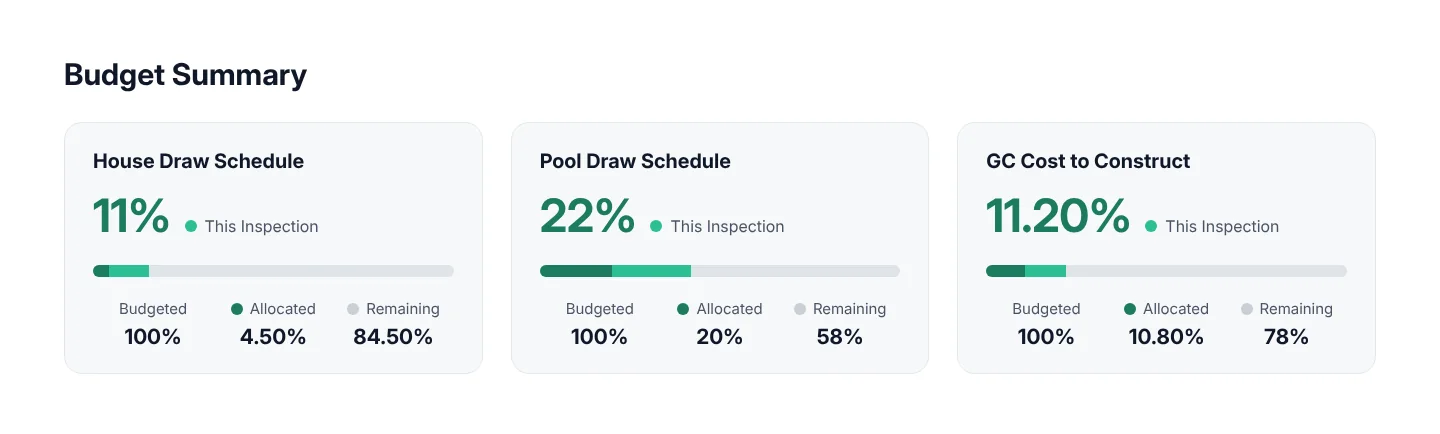
Illustration of the first page's Budget Summary for a project with three budgets, with sample figures.
One draw sheet for every budget
Each budget's draw sheet starts on its own page, labeled with the budget's name, and keeps the columns your template uses: the budgeted and allocated percentages, one column per draw with the current stage marked, and what remains. The totals at the bottom belong to that budget alone: the percentage this inspection moved and the percentage complete to date. Lines this inspection moved are boxed, with the inspector's comment where there is one. Photographs stay numbered to the lines they support, whichever budget the line sits in. After the last draw sheet, a Budget Summary table recaps every budget in one row each: budgeted, allocated, this inspection and remaining.
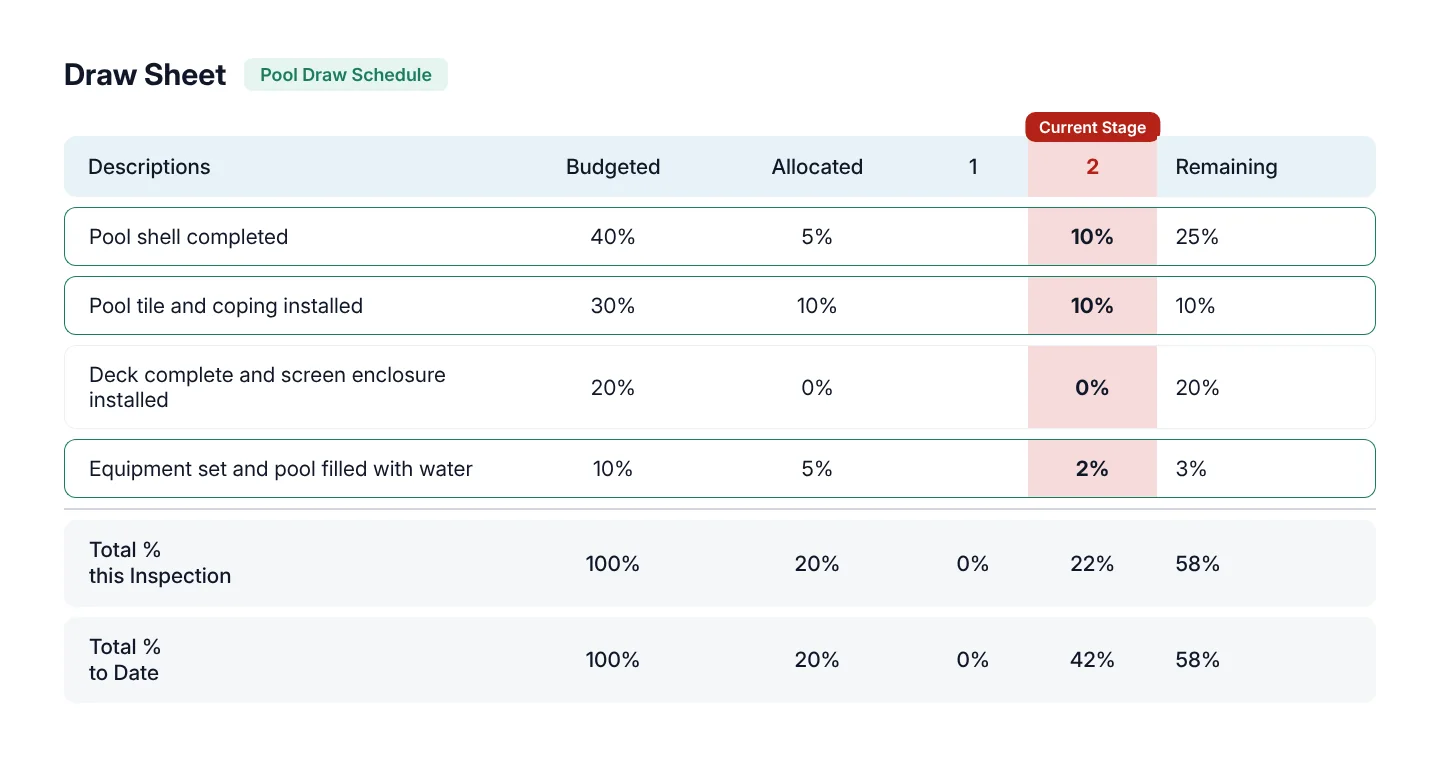
Illustration of one budget's draw sheet page with its own total rows, with sample figures.
The summary layouts RAZE drew
Four layouts were drawn for the per-budget summary before one became the standard: cards, with the figure this inspection moved highlighted and a progress bar; bars, one row per budget with the four figures beside a progress bar; tiles, a strip of four figures per budget; and a compact table, one row per budget. The cards read fastest when the budgets differ in size, so they open the report. The compact table earned a place too: it closes the draw sheets as the Budget Summary recap, where one row per budget sits beside the line-level detail.
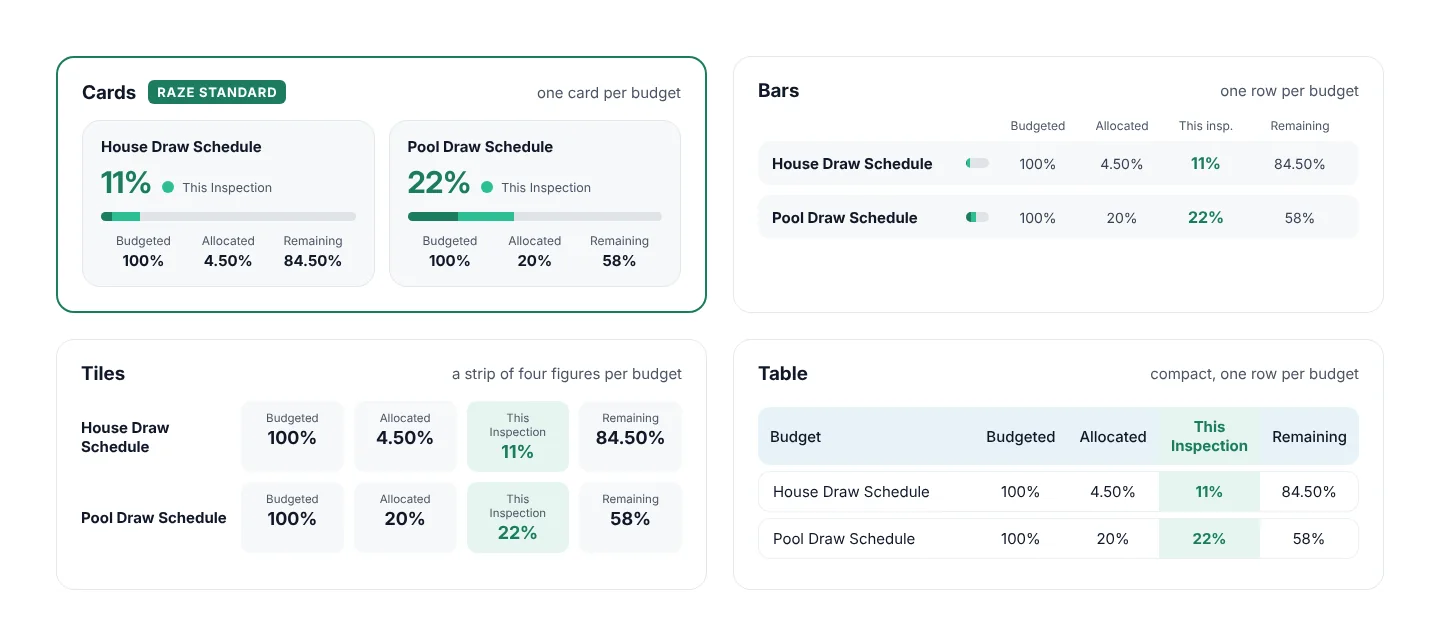
The four summary layout concepts, with the cards marked as the RAZE standard. Sample figures, the same on every concept.
What the breakout gives a reviewer
A draw file gets read by people who were not on site: loan review, internal audit, a participant and, at examination, the regulator. Budget monitoring sits on their lists; the OCC's handbook names it among the controls of an effective construction program, and the FDIC's procedures look at whether the undisbursed balance can still finish the job. See how examiners review construction loan monitoring.
When two budgets share one sheet, the reviewer has to rebuild the split before any of those questions can be answered. With one sheet and one set of totals per budget, each budget's funding reads on its own, the remaining balance is visible per budget, and the summary on page one shows the whole project at a glance. The file answers the question instead of the reviewer's spreadsheet.
The multi-budget report at a glance
Per-budget summary
One card per budget on the first page, with the percentage this inspection moved highlighted and a progress bar.
Draw sheet per budget
Each budget's lines on their own page, labeled with the budget's name, with its own totals, and a Budget Summary table after the last sheet.
Your template, with or without a cover
The breakout follows your logo, colors, columns and cover page setting; everything else in the report is the same.
Residential Standard report
The standard layout of the residential draw inspection PDF. Commercial reports carry one budget for now.
Frequently asked questions
Setting up budgets, line by line: Setting Up the Budget. What a RAZE report carries and the draw sheet styles you can choose from: draw inspections on RAZE. What to require in every draw report before year-end: the draw inspection report standard.
See the report in your format
Page through a sample report, or ask for one built to your template.
See the RAZE draw inspection report in your format.
Request a Demo